Essential Security Patches for Older Apple Devices: What You Need to Know
On May 11, Apple rolled out a series of critical security updates aimed at older iPhones, iPads, and Macs. These patches address vulnerabilities in key components like WebKit, the kernel, Wi-Fi, and sandbox protections. Even if your device is several years old and running an older operating system, Apple continues to support it with these fixes. Below, we answer common questions about these updates to help you understand why they matter and how to stay protected.
1. What security updates did Apple release on May 11?
Apple released a major batch of security updates on May 11, targeting both current and legacy versions of macOS, iOS, and iPadOS. The specific releases include macOS Tahoe 26.5, macOS Sequoia 15.7.7, macOS Sonoma 14.8.7, iOS 18.7.9, iPadOS 18.7.9, iPadOS 17.7.11, iOS 16.7.16, and iOS 15.8.8. These updates fix critical flaws that could allow attackers to compromise your device through WebKit exploits, kernel-level access, Wi-Fi vulnerabilities, and sandbox escapes. Apple issued detailed advisories explaining each vulnerability, emphasizing the urgency for users to apply the patches.
2. Which devices and OS versions are affected by these patches?
The updates cover a wide range of older devices. For iPhones, the patches apply to models still running iOS 15, 16, and 18 (including iOS 18.7.9). iPads get fixes for iPadOS 17.7.11 and iPadOS 18.7.9. Macs benefit from patches for macOS Tahoe 26.5 (the latest), as well as older versions Sequoia 15.7.7 and Sonoma 14.8.7. Essentially, any Apple device that is more than a decade old but still supported by its original OS version will receive these security updates. This includes iPhones and iPads that haven’t upgraded to the newest system.
3. What specific vulnerabilities were patched in this release?
According to Apple’s advisories, the updates address flaws in the kernel, WebKit, Wi-Fi, sandbox protections, privacy systems, and file handling frameworks. The kernel flaws could let an attacker execute arbitrary code with system privileges. WebKit vulnerabilities could allow malicious web content to execute code, often used in drive-by attacks. Wi-Fi bugs might enable a remote attacker to crash or hijack a device’s wireless connection. Sandbox escapes can break out of Apple’s security containment and access sensitive data. These are serious issues that could lead to data theft, espionage, or device takeover if left unpatched.
4. Why should I update my older iPhone, iPad, or Mac now?
Updating is crucial because these vulnerabilities are actively exploitable in the wild. WebKit flaws are particularly dangerous—they can be triggered simply by visiting a malicious website. Kernel and Wi-Fi bugs could allow attackers to gain deep system access without your knowledge. By not installing the patch, you leave your device exposed to malware, data breaches, and privacy invasions. Apple explicitly states that these updates fix issues that may have been exploited, so delaying puts your personal information at risk. Even if your device is old and not your primary one, attackers still target it—especially since older systems often have weaker defenses.

5. How long does Apple support older devices with security updates?
Apple has a strong track record of supporting devices long after their release. The May 11 updates cover iPhones and iPads that are more than a decade old, such as models running iOS 15 (first released in 2021) or even iOS 16 (2022). Similarly, Macs from 2013 or earlier still receive patches for macOS Sonoma and earlier versions. This means Apple continues shipping security fixes for devices that fall behind the newest operating systems, often for 5–7 years or more. However, support eventually ends, so it’s wise to check Apple’s latest update regularly.
6. What are WebKit and kernel flaws, and why are they serious?
WebKit is the browser engine powering Safari and many third-party apps. Flaws in WebKit can let attackers run arbitrary code when you visit a compromised website—no action needed beyond loading the page. This makes WebKit bugs a favorite target for cybercriminals and state-sponsored groups. Kernel flaws affect the core of the operating system, giving attackers the highest level of control over the device. If exploited, a kernel bug can bypass all security layers, steal passwords, install spyware, or even brick the device. Both types are considered critical because they can be exploited remotely and with minimal user interaction.
7. How can I apply these security updates on my device?
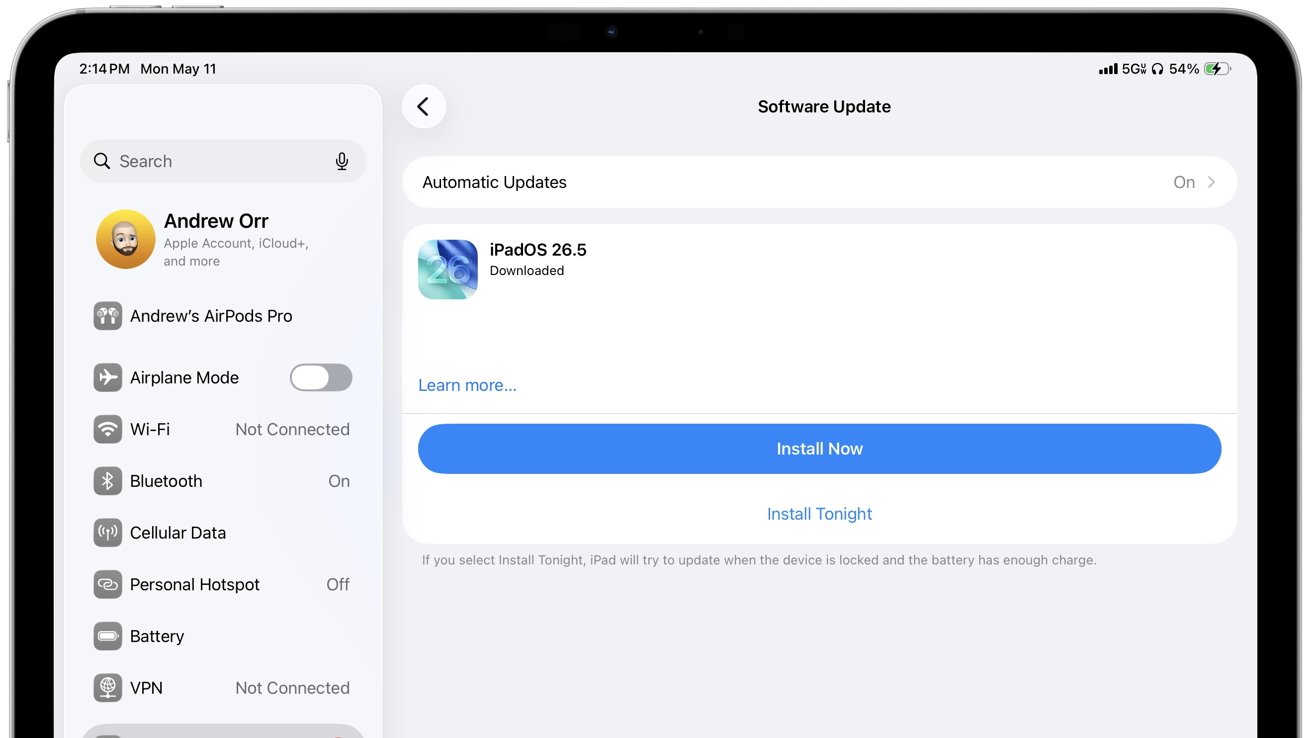
To get the patches, go to Settings on your iPhone or iPad, tap General, then Software Update. On a Mac, open System Settings (or System Preferences on older macOS), choose Software Update, and click Update Now. Make sure your device is connected to Wi-Fi and has sufficient battery life. If your device is running an older OS version like iOS 15 or macOS Sonoma, Apple will push the specific update (e.g., iOS 15.8.8 or macOS Sonoma 14.8.7) directly. For devices that can’t upgrade to the latest OS (e.g., iOS 19), these legacy patches are the only way to stay secure. Install them as soon as possible.
Related Articles
- TelemetryDeck's Swift-Driven Backend Handles 16 Million Monthly Users with Unprecedented Efficiency
- 7 Key Changes with Flutter’s Swift Package Manager Default
- Swift-Powered Analytics Service Handles 16 Million Users Monthly, Proving Server-Side Viability
- Swift for Windows Gains Dedicated Workgroup to Drive Platform Support
- Your Complete Guide to Tuning Into Apple’s Q2 2026 Earnings Call Live
- A Comprehensive Guide to the Swift Windows Workgroup
- YouTube Overhauls Mobile App Navigation: Subscriptions Tab Moved in Sweeping Redesign Test
- Master Your Large Phone: The Ultimate Guide to Android's One-Handed Mode